

You spend many hours at a desk, and the repetitive motion of a traditional mouse can turn into a nagging ache or even chronic wrist pain. Choosing the right vertical mouse lets you keep your hand in a neutral, handshake position, which lowers forearm twisting and reduces strain. In this guide you will discover the best ergonomic vertical mouse wireless for wrist pain relief, learn how each model differs, and see which one matches your workflow and budget.
Top Picks
|
Category |
Product |
Price |
Score |
|---|---|---|---|
|
🏆 Best Precision |
$109.45 |
90/100 |
|
|
💰 Best Value |
$65.40 |
85/100 |
|
|
⭐ Best Battery Life |
$74.99 |
88/100 |
Selection Criteria
You should prioritize a mouse that keeps your hand upright, offers enough programmable buttons for shortcuts, and supports the operating systems you use. Battery endurance matters because frequent replacements interrupt work, so models with long‑life rechargeable cells or efficient AA options are preferred. Sensor DPI range and adjustable speed controls help you fine‑tune cursor movement without extra hand effort. Finally, price and warranty give a sense of overall value, especially if you are investing in a device to protect your health.
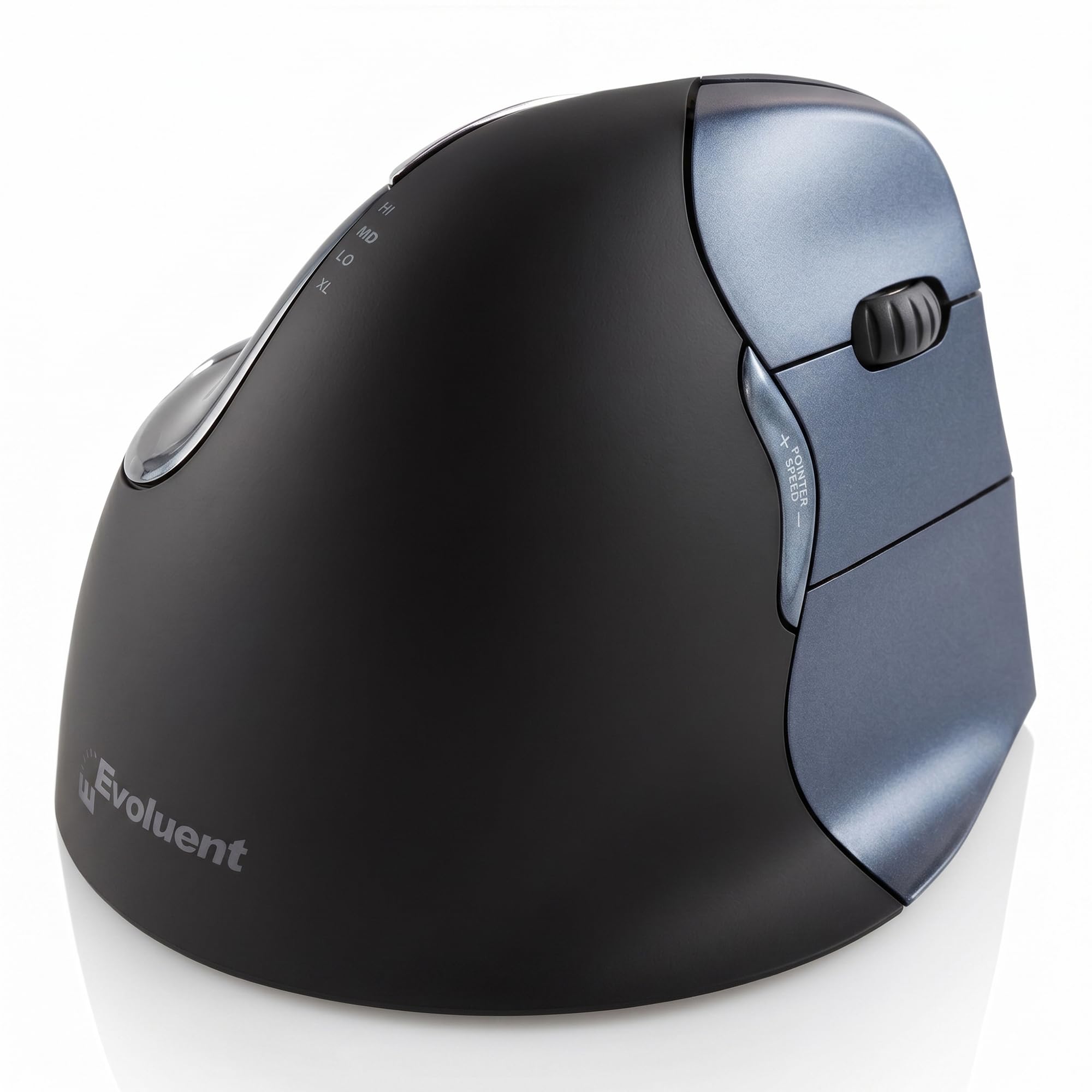
You’ll find the Evoluent VerticalMouse 4 to be a solid pick when you’re looking for the best ergonomic vertical mouse wireless for wrist pain relief. Its patented shape puts your hand in a natural handshake position, cutting down on forearm twist during long work sessions. The thumb rest is reshaped for extra comfort, and the side‑mounted speed slider lets you adjust cursor speed without letting go. Whether you’re drafting documents or navigating design software, it stays comfortable and responsive, making it a reliable everyday companion.
What People Say
Customers consistently mention how the mouse feels comfortable even after hours of use, noting that the upright design really eases wrist tension. Many appreciate the easy‑to‑reach thumb buttons and the intuitive speed‑control slider, while a few point out that the AA batteries need periodic replacement.
Overall, reviewers feel the ergonomics live up to the promise of wrist‑pain relief.
|
Pros |
Cons |
|---|---|
|
✅ Excellent ergonomic shape |
❌ Requires AA batteries |
|
✅ Responsive optical sensor |
❌ Higher price point |
|
✅ Easy thumb‑button access |
❌ USB receiver only, no Bluetooth |
|
✅ Adjustable DPI with clear LED indicator |
Ease of Use
|
Feature |
Ease Level |
|---|---|
|
Side speed control slider |
Easy |
|
Thumb buttons |
Easy |
|
Button programming via software |
Moderate |
|
LED DPI indicator |
Easy |
Compatibility
|
Platform |
Compatibility Level |
|---|---|
|
Windows |
Full |
|
macOS |
Basic |
|
Linux |
Basic |
|
Chrome OS |
Basic |
Key Benefits
- Neutral hand position reduces forearm strain
- Six customizable buttons for shortcuts
- Side‑mounted speed control with LED feedback
- Reshaped thumb rest adds extra comfort
- Optical sensor with 2600 DPI accuracy
Current Price: $109.45
Rating: 4.2 (total: 2,416+)

You’ll find the Lift to be a solid choice when you want the best ergonomic vertical mouse wireless for wrist pain relief without breaking the bank. Its 57° tilt lifts your wrist into a natural handshake position, which helps keep forearm tension low during long work sessions.
The SmartWheel scroll feels smooth for everyday browsing or detailed design work, and the Easy‑Switch lets you hop between three devices with a single click. Whether you’re writing reports, editing photos, or juggling multiple screens, the Lift stays comfortable and responsive, making it a reliable daily driver.
What People Say
Reviewers repeatedly note how comfortable the mouse feels right away, mentioning that the angled design really reduces wrist fatigue. Many appreciate the long battery life and the convenience of switching between multiple computers, while a few point out occasional Bluetooth pairing quirks on certain operating systems. Overall, users feel the Lift delivers on its promise of ergonomic relief.
|
Pros |
Cons |
|---|---|
|
✅ Comfortable angled design |
❌ AA battery must be replaced eventually |
|
✅ Exceptional battery longevity |
❌ Bluetooth connectivity can be finicky on some platforms |
|
✅ Simple device switching |
❌ No wired option for instant plug‑and‑play |
|
✅ Customizable buttons and SmartWheel |
Ease of Use
|
Feature |
Ease Level |
|---|---|
|
Vertical angle & grip |
Easy |
|
Button programming via Logi Options+ |
Moderate |
|
SmartWheel scrolling |
Easy |
|
Easy‑Switch device toggle |
Easy |
Compatibility
|
Platform |
Compatibility Level |
|---|---|
|
Windows |
Full |
|
macOS |
Full |
|
iPadOS |
Full |
|
Chrome OS |
Basic |
|
Linux |
Basic |
Key Benefits
- 57° vertical angle eases wrist strain
- Four customizable buttons via Logi Options+
- SmartWheel provides precise, effortless scrolling
- 24‑month battery life from a single AA
- Easy‑Switch lets you toggle up to three devices
Current Price: $65.40
Rating: 4.4 (total: 14,113+)

You’ll notice a difference the moment you switch to the MX Vertical, which makes it a strong contender for the best ergonomic vertical mouse wireless for wrist pain relief. Its 57° tilt keeps your hand in a natural handshake position, easing forearm strain during long workdays or creative sessions. The high‑precision 4000 DPI sensor reduces the amount of hand movement you need, and the quick‑charge feature gives you three hours of use after just a minute on the charger.
Whether you’re tackling spreadsheets, designing graphics, or gaming casually, the MX Vertical offers the comfort and performance you need without sacrificing speed.
What People Say
Customers frequently highlight how the mouse feels comfortable right out of the box and notice a real reduction in wrist fatigue after extended use. The fast charging and long battery life are commonly praised, as is the precise sensor that makes navigation feel smoother. A few reviewers mention a short learning curve to get used to the vertical angle and wish for more programmable buttons, but the overall sentiment is positive.
|
Pros |
Cons |
|---|---|
|
✅ Effective wrist‑relief design |
❌ Higher price point |
|
✅ High‑precision 4000 DPI sensor |
❌ Only four buttons available |
|
✅ Long battery life with quick charge |
❌ Requires USB receiver for Bluetooth connectivity |
|
✅ Customizable DPI switch |
❌ Battery life can vary with heavy use |
Ease of Use
|
Feature |
Ease Level |
|---|---|
|
Vertical angle and grip |
Easy |
|
DPI switch button |
Easy |
|
One‑minute quick charge |
Easy |
|
Software customization |
Moderate |
Compatibility
|
Platform |
Compatibility Level |
|---|---|
|
Windows |
Full |
|
macOS |
Full |
|
iPadOS |
Full |
|
Chrome OS |
Basic |
|
Linux |
Basic |
Key Benefits
- 57° tilt promotes a neutral wrist posture
- 4000 DPI high‑precision sensor reduces hand movement
- One‑minute quick charge provides three hours of use
- Four‑month battery life on a full charge
- Dedicated DPI switch button for instant adjustments
Current Price: $74.99
Rating: 4.4 (total: 15,176+)
FAQ
Will a vertical mouse really help with my wrist pain?
You’ll find that a vertical design keeps your hand in a more natural, handshake position, which reduces forearm twisting and the strain that often leads to wrist discomfort. The ergonomics of the best ergonomic vertical mouse wireless for wrist pain relief are specifically engineered to promote a neutral wrist posture, so most users notice less fatigue after a few days of use.
Do I need special drivers or software to use these mice?
You can plug the mouse into most computers and start using basic functions right away, but the included driver or Logi Options+ software lets you assign shortcuts and fine‑tune settings. Using the software is optional; the core ergonomics work without any extra installation, so you’re not locked into a specific platform.
How long will the battery last and what type does it use?
You’ll get several months of operation on a single set of batteries – the Evoluent model uses two AAA cells for about three months, while the Logitech options rely on a single AA or a built‑in rechargeable cell that can last from two years up to four months depending on the model. Long battery life means you won’t be interrupted by constant replacements, and the quick‑charge feature on some units gives you a few hours of use after just a minute of charging.
Wrapping Up
By selecting a wireless ergonomic vertical mouse you give your wrist a healthier posture while still enjoying the freedom of cordless use. The Evoluent Vertical excels in precision with six customizable buttons, the Logitech Lift delivers solid performance at an affordable price, and the Logitech MX stands out for its long‑lasting rechargeable battery. Any of these options can help you work longer with less discomfort, turning a simple peripheral into a key part of your ergonomic strategy.
This Roundup is reader-supported. When you click through links we may earn a referral commission on qualifying purchases.